
%20(1).png)
It’s just 2,000 orders a day. How complex can it be?
That’s what someone said to me the other day when I mentioned one of our customers pushes around 700,000 orders through their warehouses. They did the mental math, got to 2,000/day, and moved on with their life.
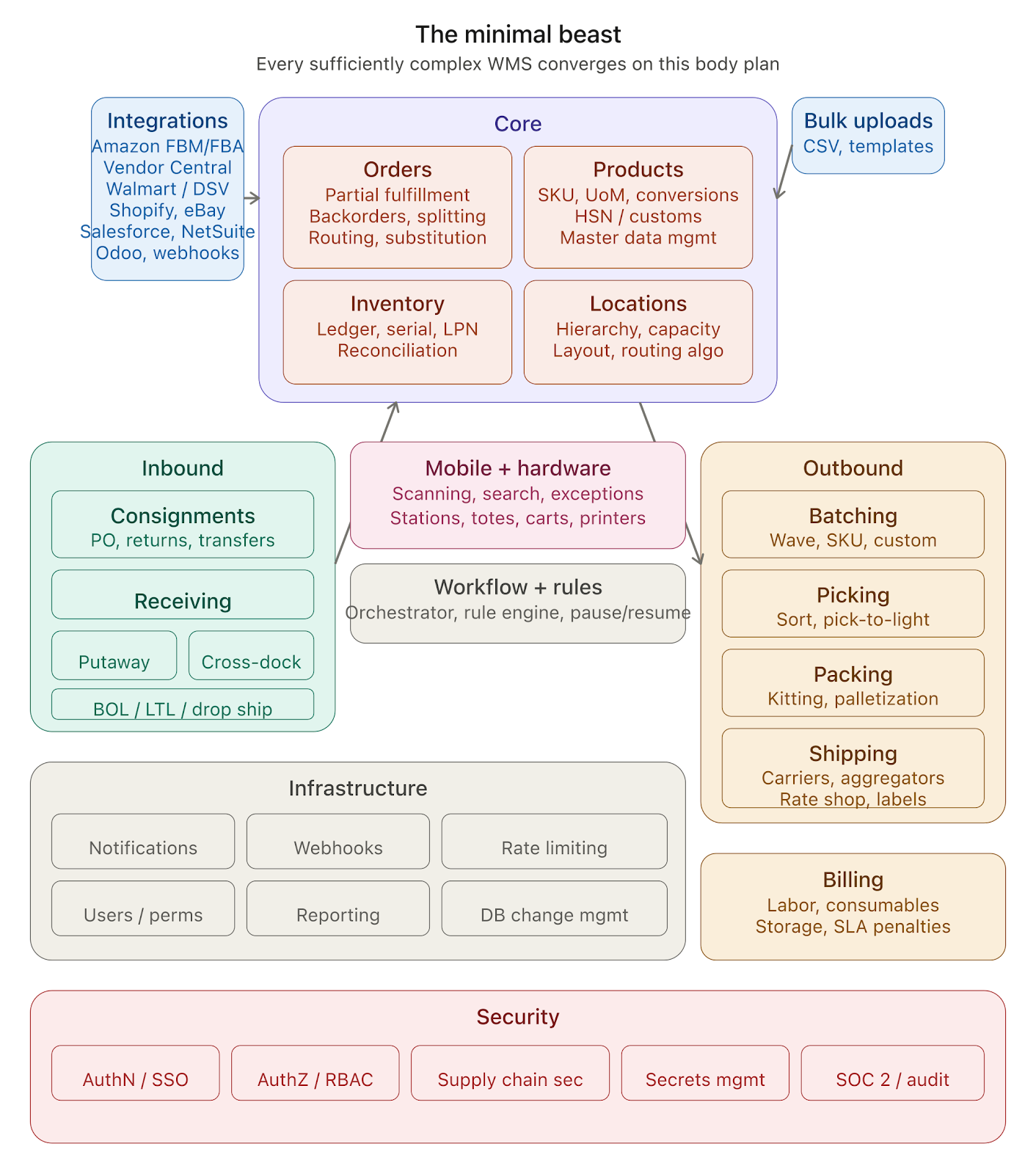
My brother in christ - every single box in that diagram above exists because someone, at some point, said “we don’t need that” and then learned otherwise. Usually at 2am. Usually during peak season.
With the current vibe coding hoopla, I keep running into this sentiment: just prompt your way to a warehouse management system. To which I say - please, go ahead. We are genuinely happy if people can vibe code their way out of their problems. We’ll be here when things get big enough.
So let’s build that diagram from scratch. Let’s start with one box and see how we end up with sixty.
Start simple. An order.
You own a warehouse and you want to allow merchants to fulfill orders. Good starting point.
So you build a system to allow merchants to add an order. But what even is an order?
At its core, an order is a collection of order line items: a product and its quantities.
Hold that thought.
System so far:
- Order system
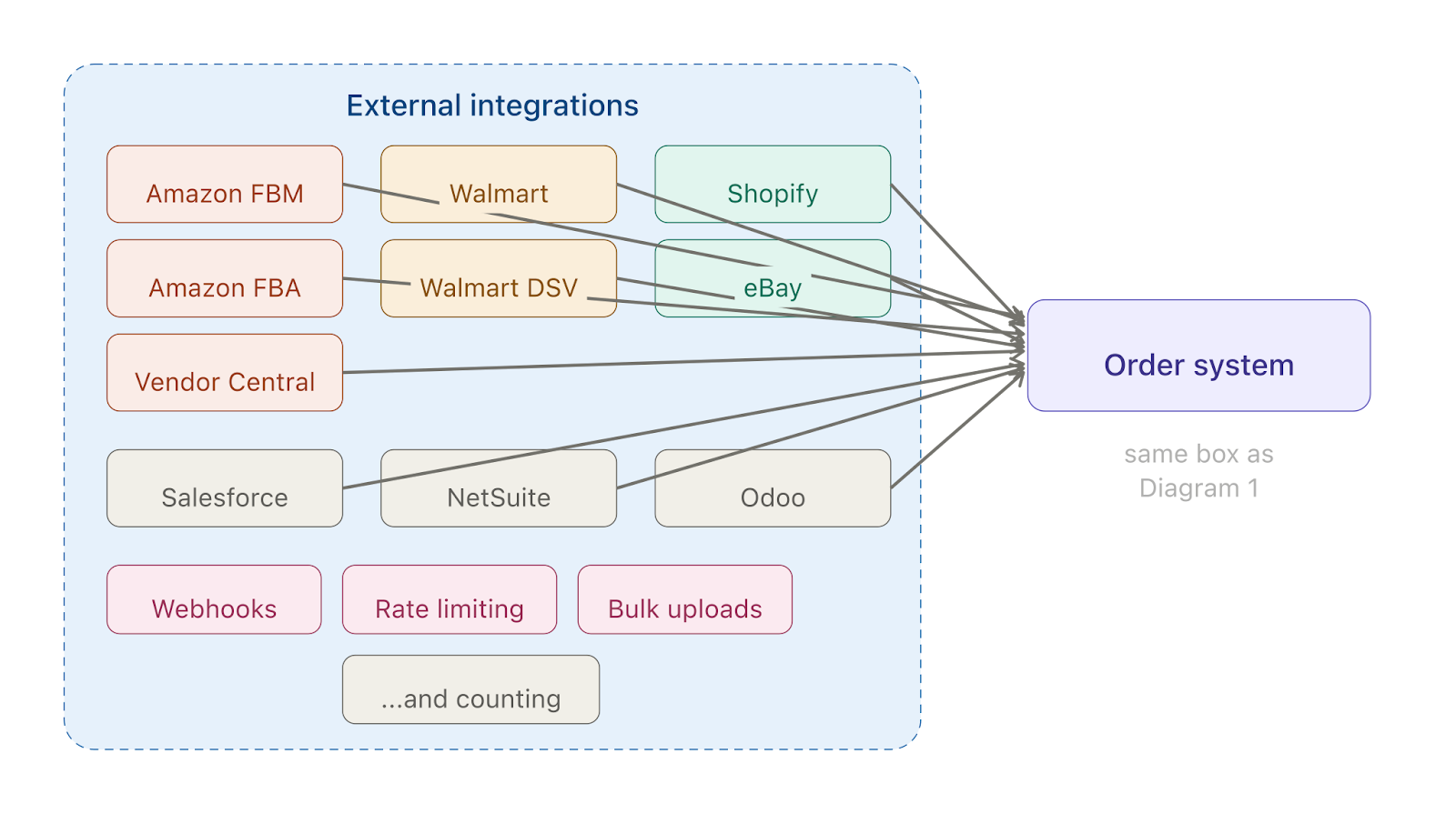
Now you’re a “modern” warehouse so your customers want you to pull orders from their existing systems. This can be multiple “sources”, and sources can mean anything from which you can pull orders. This can range from “simple” (it’s a misnomer - there is nothing simple in logistics, there is only the painful and the less painful) to outright hostile.
System so far:
- Order system
- External integrations
How hard can that be, right? Surely there can’t be a lot of these.

The Integration Hellscape
Amazon You need an app and an onerous approval process with a high rejection rate just to get access to your own data in order to fulfill. Then you realize that Amazon has FBA (Fulfillment by Amazon), which means you don’t pull an “order.” Instead you send the equivalent of a consignment to Amazon’s warehouse, and Amazon fulfills from there. Now you need to represent this differently because it’s not an order per se - you need to create an “Inbound” to Amazon. Oh, and Amazon introduced charges for its SP-API to access your own data. If you want to reduce costs you need to use its notifications API, which you can do only if you have an AWS account. If your customers have stores in other countries, be prepared to have 3 AWS accounts across regions. And if you do this, be prepared for Amazon bills, requests for audits, especially if you have FBM access.
eBay Sure, make an app. And they will never ever reveal their rate limits to you.
Shopify We love REST. We love REST. No, wait, we love GraphQL now. We love GraphQL. Actually we love both. We love both.
Salesforce You’d think implementing one Salesforce Commerce Cloud integration means you’ve done them all. You’d be wrong. Every customer has customized it into a different animal.
NetSuite looks the same across customers the way all Tolstoy families are alike - which is to say, they aren’t. Every single implementation is different because everyone customizes the hell out of it.
Odoo - same story, different flavor. ERPs might look the same on the brochure but everyone bends them until they break in unique and special ways.
System so far:
- Order system
- External integrations
- Amazon (FBM + FBA)
- eBay
- Shopify
- Salesforce
- NetSuite
- Odoo
- …and you will keep adding more because ordering systems proliferate
You will also need resilient ways to pull from systems that have no webhooks, and a way to respect rate limits for 3rd party integrations that are stingy about telling you what those limits even are. You’ll need a webhook system to receive real-time pushes when they’re available. And you’ll need rate limiting on your own end so you don’t get throttled into oblivion.
And your merchants? They’re not all on fancy ecommerce platforms. Some of them are going to want to upload orders via CSV. Or products via CSV. Or consignments via CSV. You need a bulk upload module - for orders, for products, for inventory adjustments, for everything. And it can’t just be a dumb file parser. It needs validation, error reporting row by row, the ability to handle partial failures, and it needs to not fall over on a 50,000-row file. You’ll also want an upload template manager because every customer has a different column layout they refuse to change.
What even is a Product?
At this moment you realize you need a way to represent items. Let’s call them “Products.”
Your order contains:
- Products
- Quantities
But what is a product?
- A name (e.g., Coca-Cola)
- An identifier (e.g., SKU)
- A quantity (2)
This means nothing without units. Do they mean 2 bottles of Coca-Cola or 2 cartons? What even is a carton?
So now you need a Unit of Measure (UoM) system:
- A bottle of Coca-Cola → an Each
- 6 bottles → a Case
- 48 cases → a Pallet
Orders can come in any unit. You need conversion. And the units themselves are not standardized, a “case” of Coca-Cola and a “case” of Apples have 2 different meanings. So you need a UoM configuration manager and master data management for custom UoMs.
Oh and you thought a product was just… a product? A red shirt and a white shirt are the same shirt. Except they’re not. They’re variants. A 12oz Coca-Cola and a 2-liter Coca-Cola are both Coca-Cola. Except in your system they need different SKUs, different barcodes, different weights, different packaging, different shelf locations, and your customer still wants to see them grouped together in reports as “Coca-Cola” while your pickers need to see them as completely separate items so they don’t ship the wrong one. So now you need a product variants module - parent-child relationships between products, shared attributes at the parent level, unique attributes at the variant level, and the ability to search, filter, and report at both levels without losing your mind. And every integration handles variants differently. Shopify has variants built in. Amazon has parent-child ASINs. Some ERPs don’t have the concept at all and just flatten everything into individual SKUs. So your variants module also needs to normalize across all of these into a single representation that your warehouse workers can actually use.
And if your merchants are shipping internationally (and they will be), you need HSN (Harmonized System Nomenclature) codes on your products. These are the classification codes that customs authorities use to determine duties and taxes. Every product needs one. They’re hierarchical, they vary by country, and getting them wrong means your shipment gets held at the border. So you need a customs and compliance module: HSN code management, country-specific tariff lookups, and the ability to generate customs declarations. This is not optional for anyone doing cross-border.
And then the President decides to impose tariffs.
Overnight, your customers are scrambling. Products that shipped fine last week now need different HTS codes. Duty rates that were 2.5% are suddenly 25%. Country of origin, a field nobody looked at twice is now the most important attribute in your product catalog. Your customers need to reclassify thousands of SKUs, figure out which shipments in transit are affected, and decide whether to reroute, hold, or eat the cost.
You need the ability to update classification codes across thousands of products in one shot with an audit trail. You need country of origin tracked at the product level
System so far:
- Order system
- External integrations (Amazon, eBay, Shopify, Salesforce, NetSuite, Odoo…)
- Bulk upload module + upload template manager
- Product management
- SKU / Identifier
- UoM system + UoM configuration (1 case = 6 each) + UoM master data management
- Customs & compliance (HSN codes, tariff lookups, declarations)
Inventory and Locations
If you have to fulfill, you need inventory. And you’re in a warehouse, so inventory sits in locations.
Inventory can’t be point-in-time because you need auditing and the ability to time travel. So you build a ledger-based immutable inventory system. But you will have discrepancies, so you need reconciliation.
And reconciliation is not a one-time event. You can’t just shut down the warehouse once a year, count everything, and call it a day. That’s a full physical inventory count and it’s expensive. You’re paying people to not fulfill orders while they walk around with clipboards. So you need cycle counting, the practice of counting a small subset of inventory on a rotating schedule so that over time you’ve covered everything without ever stopping operations. But cycle counting is its own beast. Which locations do you count today? Do you prioritize high-value items? High-velocity items? Items with recent discrepancies? Do you count by zone, by SKU, by random sample? What happens when the count doesn’t match, do you adjust immediately or do you trigger a recount? Who has permission to approve adjustments? You need a cycle count scheduler, a count execution workflow on the mobile app, a discrepancy resolution process, and adjustment audit trails because your customers will absolutely want to know why their inventory numbers changed at 3pm on a Tuesday.
And you assumed inventory quantities are integers. Of course they are, you have 7 bottles of something, not 7.3. Until a customer shows up and says they deal in liquids. They sell paint by the gallon but receive it in 55-gallon drums and dispense it in fractional amounts. They need 2.75 gallons allocated to this order. And no, they will not track it in fluid ounces to keep your integers clean they've been doing it in gallons with decimals for 20 years and they are not changing. So now your entire inventory system - your ledger, your allocation engine, your reconciliation, your cycle counts, your UoM conversions needs to support decimal quantities. And not just "add a decimal column." You need to decide on precision. You need to handle rounding in allocations without losing or creating phantom inventory. You need to make sure that 10 orders each taking 0.33 gallons from a 3.30 gallon container doesn't leave you with 0.00000001 gallons that your system thinks is real inventory.
You need the ability to track serialized inventory, items with unique serial numbers, like electronics or pharmaceuticals. And you need License Plate Numbers (LPNs) to track collections of items as a single scannable unit (a pallet, a tote, a carton) so workers aren’t scanning 200 individual items when they can scan one label. You need the ability to reserve locations, because when a putaway is in progress, you don’t want another task to target the same bin.
Now, locations in a warehouse are not flat. They exist in hierarchies with different hierarchies in the same warehouse. An aisle has racks, each rack has a face, a level, and a position within it. Some locations are on the floor. Some are on pallets. Some are high up, so you need to know if a forklift can reach them. Some locations can be full, and you need to know that because you don’t want to send someone to put an item in a full bin.
A serious warehouse typically sections itself into a primary pick area and a refill area. You need to represent these sections. You need storage hierarchies, capacity management, and a location control plane.
And because this is a physical space, you need the warehouse layout itself codified in your system. Not just the logical hierarchy but the actual spatial arrangement: which aisle connects to which zone, how far apart locations are, what the optimal path through a section looks like. This feeds directly into routing, and every warehouse has a different layout, which means you need a custom route algorithm per warehouse.
System so far:
- Order system
- External integrations
- Bulk upload module + upload template manager
- Product management (SKU, UoM, conversions, customs/HSN)
- Inventory (ledger-based, immutable)
- Reconciliation
- Serialized inventory tracking
- LPN tracking
- Location reservations
- Location management
- Location hierarchy
- Storage sections
- Location control plane
- Capacity management
- Warehouse layout codification
- Per-warehouse route optimization
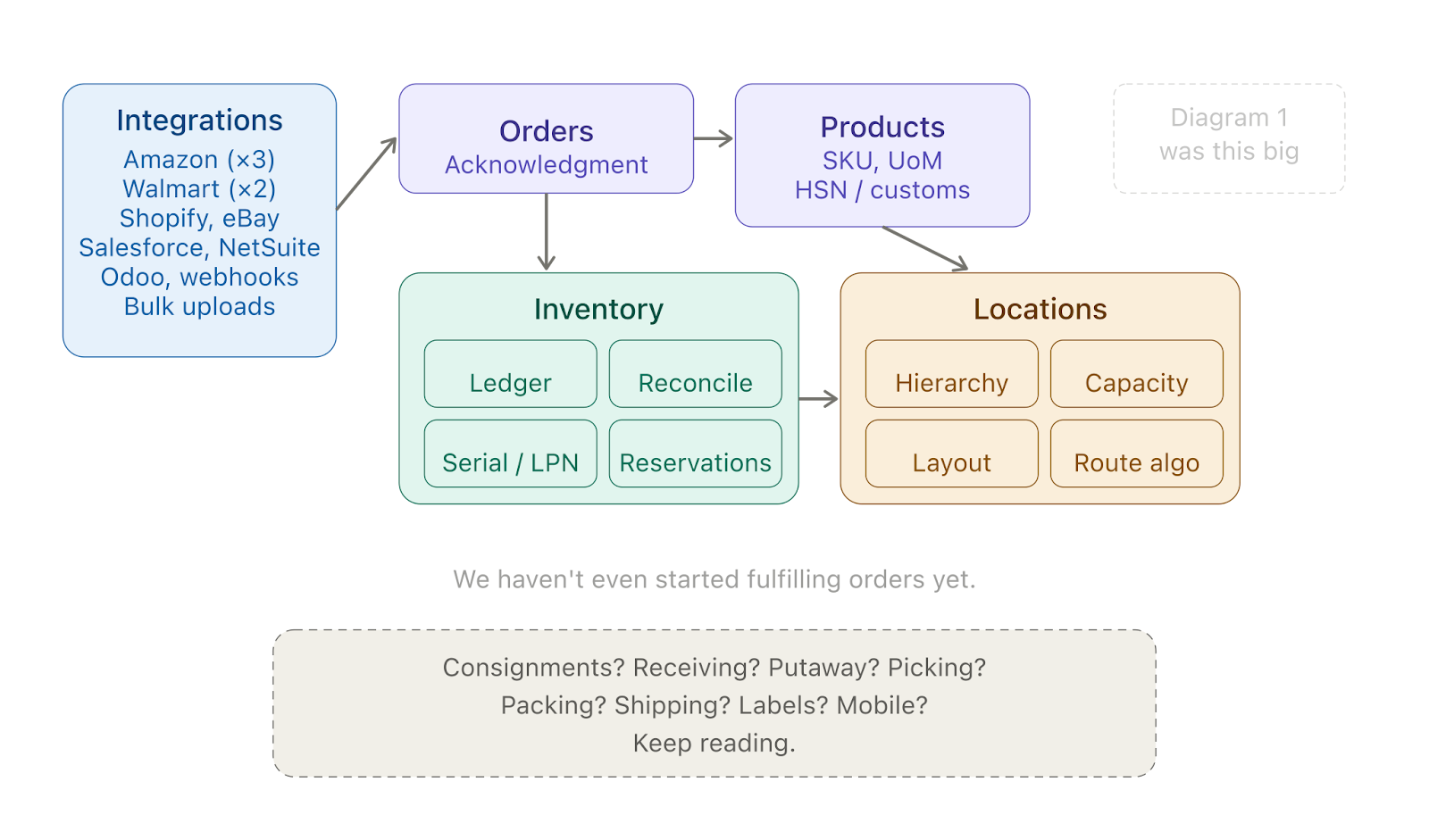
wms_diagram_3_growing_beast.png
But wait, what about the order itself?
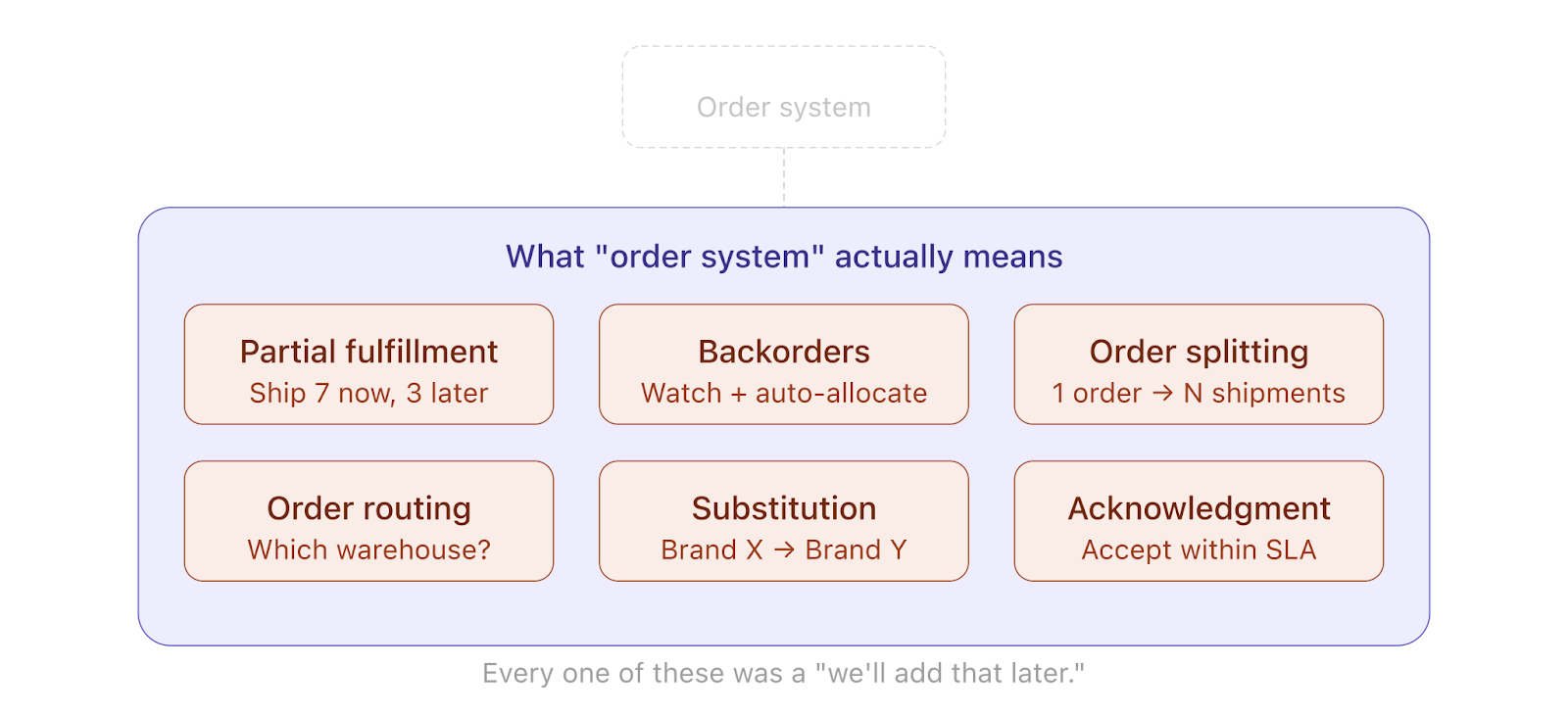
We said an order is a product and a quantity. That’s cute. Here’s what an order actually is once you’re running a real operation.
Partial fulfillment. A customer orders 10 units of something. You only have 7 in stock. Do you ship the 7 now and the rest later? Do you hold the whole thing? Your merchant needs to decide and your system needs to support both, which means you need a partial fulfillment module that can split a single order into multiple shipments, track what’s been sent and what hasn’t, and reconcile the whole mess at the end.
Backorders. Those remaining 3 units? They’re now on backorder. You need a backorder management system that watches incoming inventory and automatically allocates it to pending backorders based on priority, age, SLA, whatever rules the merchant has configured.
Order splitting. One order, but items are in different warehouses. Or one order, but some items need cold chain and others don’t. Now you need order splitting - the ability to break a single order into multiple fulfillment tasks, potentially in different locations, with different carriers, and still present it to the end customer as one order with one tracking experience.
Order routing. With multiple warehouses, you need to decide where to fulfill from. Closest to the customer? Cheapest shipping? Where inventory is most abundant? You need an order routing engine, and it needs to factor in inventory levels, shipping costs, carrier availability, and SLAs. And it needs to do this in milliseconds across thousands of orders.
Product substitution. The customer ordered Brand X Batteries but you’re out. The merchant has configured Brand Y as an acceptable substitute. You need a product substitution module that knows which products can replace which, under what conditions, and with what approval flow. This is more common than you’d think, especially in grocery and consumer goods.
Added to the system:
- Partial fulfillment
- Backorder management
- Order splitting
- Order routing engine
- Product substitution
Getting Stuff In: Consignments and Receiving
Someone has to send items to your warehouse. How?
You need a consignment system. What are the ways users can create a consignment?
- A pure consignment
- A Purchase Order linked to a consignment
- Return orders
- Stock transfers across warehouses
Your merchants are sending you consignments. A truck arrives at the warehouse. Now what?
Someone has to receive it. If you don’t, either the truck goes away or it sits at the dock costing money, fuel, waiting for space. But you don’t necessarily have space in the warehouse to keep it in certain locations, so you need a workflow for receiving items.
You need to generate a Bill of Lading (BOL) for truck pickups. You need to support LTL (Less Than Truckload) shipping for consignments that don’t fill a whole truck, which means you need to work with LTL carriers, handle freight classes, and manage dock scheduling.
After receiving, you need to figure out where these should be placed. This is called a putaway. You can’t just place them randomly because you’ll end up with inventory scattered across the warehouse. So you need a putaway recommendation system, something intelligent that considers product velocity, available capacity, proximity to pick zones, and existing inventory of the same SKU.
But sometimes you need to do a cross-dock, move incoming goods directly to an outgoing truck at an open dock. So you need a cross-docking module.
And some consignments might be directly for open orders, you don’t want to open them, place them, and re-pack them. This is a form of drop shipping and you need support for it.
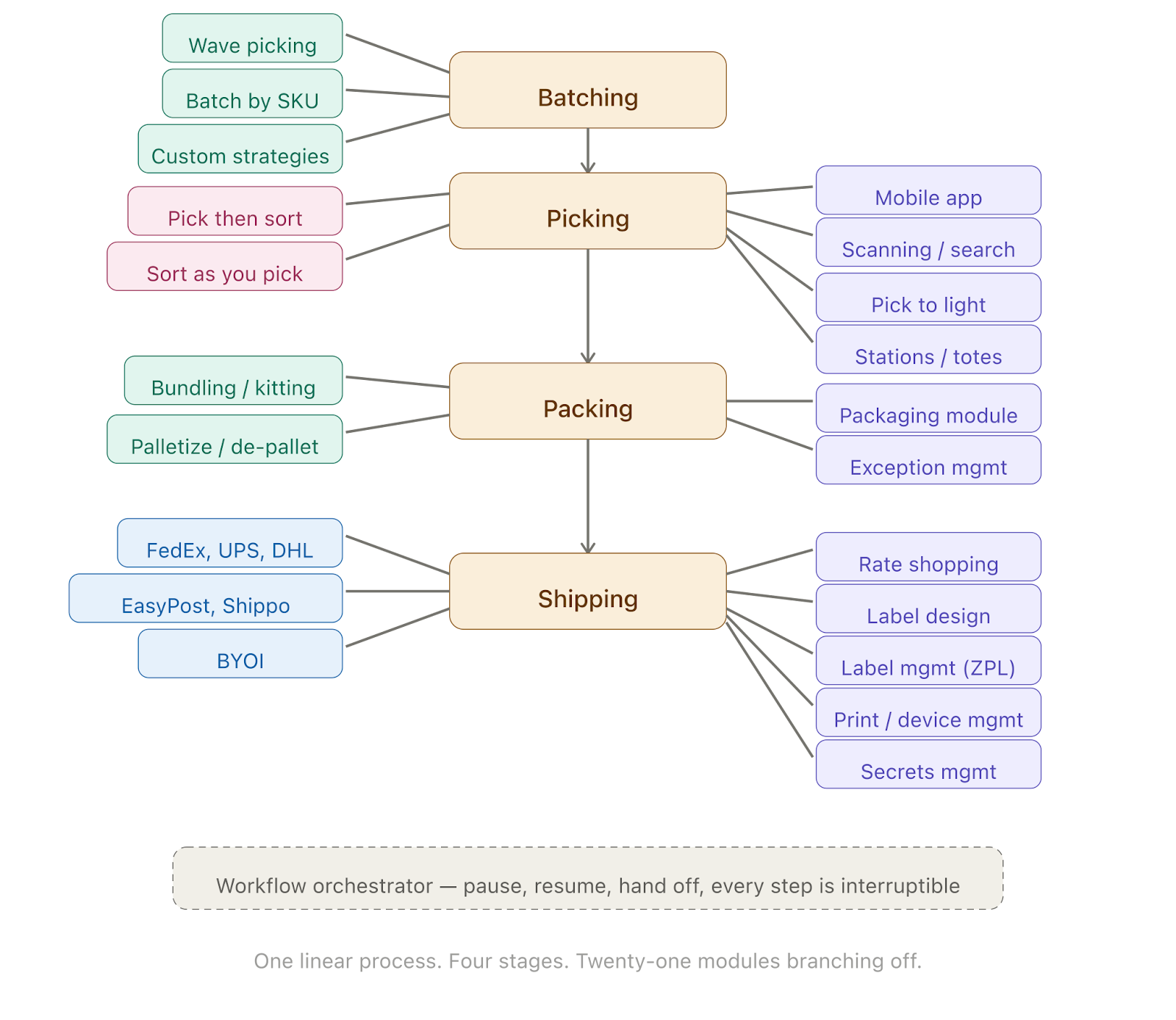
Getting Stuff Out: Batching, Picking, Packing, Shipping
Your items are placed. Your order system has 1,000 orders to fulfill today. Which ones do you fulfill and how?
Batching
You need a batching system to decide which orders to send out. Orders have different SLAs. Your workers need to be able to do all this without getting in each other’s way.
And batching is not one-size-fits-all. You’ll need multiple strategies:
- Batch by order - one picker, one order at a time
- Batch by SKU - group orders that share products, one picker grabs all units of a SKU at once
- Wave picking - release groups of orders in timed waves to balance workload across the floor
- Custom strategies, because every warehouse operation has its own opinion on what works best
The batching module checks inventory availability, does pick allocation, and dispatches tasks to pickers.
Station Management and Equipment
Pickers work at stations. You need station management: which station is where, what type of work it handles, who’s assigned to it. You need management of totes, carts, and other mobile equipment, tracking what’s in use, what’s available, what’s damaged.
You need support for hardware like pick-to-light systems, where lights on shelving guide workers to the right location and quantity. Different warehouses use different hardware, different workflows, different everything.
Which brings you to the need for a plugin architecture, because no two warehouse operations are the same and you cannot hardcode workflows for each one. You need a way to plug in different strategies, different hardware integrations, different rules per customer, per warehouse, per zone.
Mobile
Pickers can’t just go around remembering things. You need a mobile app, optimized for screen sizes ranging from smartphones to tablets, that runs snappily on older hardware while having a UX that works for all profiles of warehouse workers.
But nobody is reading anything in a warehouse. Serious operations work with barcodes, QR codes, RFID, or other tracking systems. So you need a fast scanning module. But what will the scan look up? Your customers don’t control the labels on incoming goods, those come from the factory of their suppliers. So you need a search module that works with scans, and the search needs to be near-instant across hundreds of thousands of identifiers.
Sometimes you’ll get a product from a consignment or an order whose barcode you don’t recognize. Completely possible because the product data might still be uploading while the consignment was already shipped. So you need a robust exception management module.
Packing
Someone has to pack the orders. How do you pack something? You need boxes. Who tells the users what packaging material to use for a particular SKU? You need a packaging module that tracks the kind of packing consumables used, and this is billable, so you need billing to keep track of labor and materials.
Customers send consignments in various forms. If they send a pallet with 200 Coca-Cola bottles and you get an order for 2 bottles, you need a way to track pallets that are opened or partially open in order to clear them out efficiently. So you need a palletization/de-palletization module.
You also want to be prepared for a bundling/kitting module because merchants sell a lot of bundles - a gift set is 3 different SKUs packaged as one sellable unit and you need to be able to assemble those on the fly.
Shipping
After packing you need a way to send it. You need to generate a shipping label, but there are many carrier options. You need to integrate shipping systems like FedEx, UPS, DHL. You also need to integrate with carrier aggregators like EasyPost, ShipStation, Shippo - services that sit on top of multiple carriers and give you a single API. Sounds like it simplifies things, right? Now you have to support both direct carrier integrations AND aggregator integrations, because some customers want one and some want the other and some want both for different product lines.
You also need to let customers bring their own integrations, they will not break existing carrier relationships. So you need integration management that supports BYOI (Bring Your Own Integration).
Now they’re storing their credentials in your system, which you absolutely cannot store in plain text. So you need a secrets management module for JIT encrypt/decrypt along with supporting rotation.
You need a rate shopping module to compare rates and SLAs across carriers and aggregators. You select a rate, you get a label back. But labels come back as PNGs, PDFs, ZPL files, and you need to print at a very specific size. Why? Because the order source (the ecommerce store or the ERP) will have specs. And customers will want custom branding or mandatory wording on packing slips.
So you need a label management module and a label design module so users don’t have to bother your engineering team to build new formats. Labels also come in different shapes - regular A4, tear-offs - which need precise calibration.
With so many labels printed from desktop and mobile, you need a way to bypass print permission dialogs and let users print fast. And you need to figure out how to trigger a print from the mobile app to a printer on the warehouse floor. You need a print/device management module because not all printers are equal, some operations mandate thermal printers while others with different requirements won’t.
The Stuff Nobody Thinks About
Workflow Orchestration
Someone wants to pack right after picking. Someone else wants a separate shipping step. Another customer wants a quality check between picking and packing. You need a workflow orchestrator that lets you compose these steps differently per customer, per warehouse, per product type.
Bin Transfers
It’s a warehouse. You will end up placing items inefficiently. There needs to be a way to do bin transfers that are not related to any incoming consignment or outbound order. Just reorganizing your space.
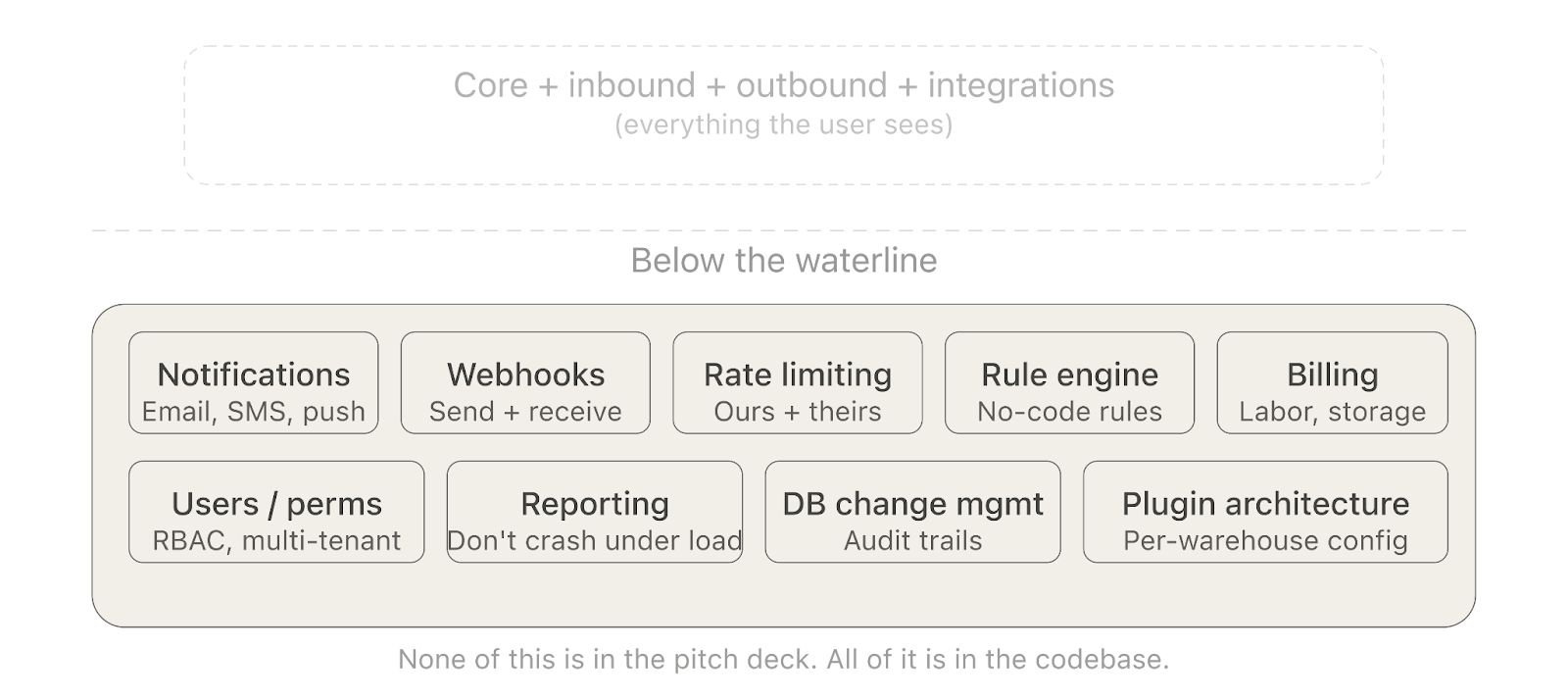
Rule Engine
You will have rules: for this order use this carrier, for this SKU use this packaging, for this customer always do quality checks, for this product to substitute with that one if out of stock. You need a rule engine that can express and evaluate these without code changes.
Notifications
People need to know when things happen. When a consignment arrives, when an order is packed, when there’s an exception, when a backorder gets fulfilled. You need a notifications management system - email, SMS, in-app, push - with the ability to configure who gets what and when.
Database Operations
At scale, you’ll need structured ways to do database edits, not some engineer running raw SQL in production at 2am. You need migration tooling, audit trails, change tracking. Every manual data fix needs to be traceable because when something goes wrong (and it will), you need to know what changed, when, and by whom.
User Management, Permissions, and the Rest
You need user management, customer management, permissions management. You need a dashboarding system, a reporting system that will not crash under operational load.
Security: The Thing You Can’t Ignore and Can’t Finish
You’ve built all this. Now you need to make sure it doesn’t get owned.
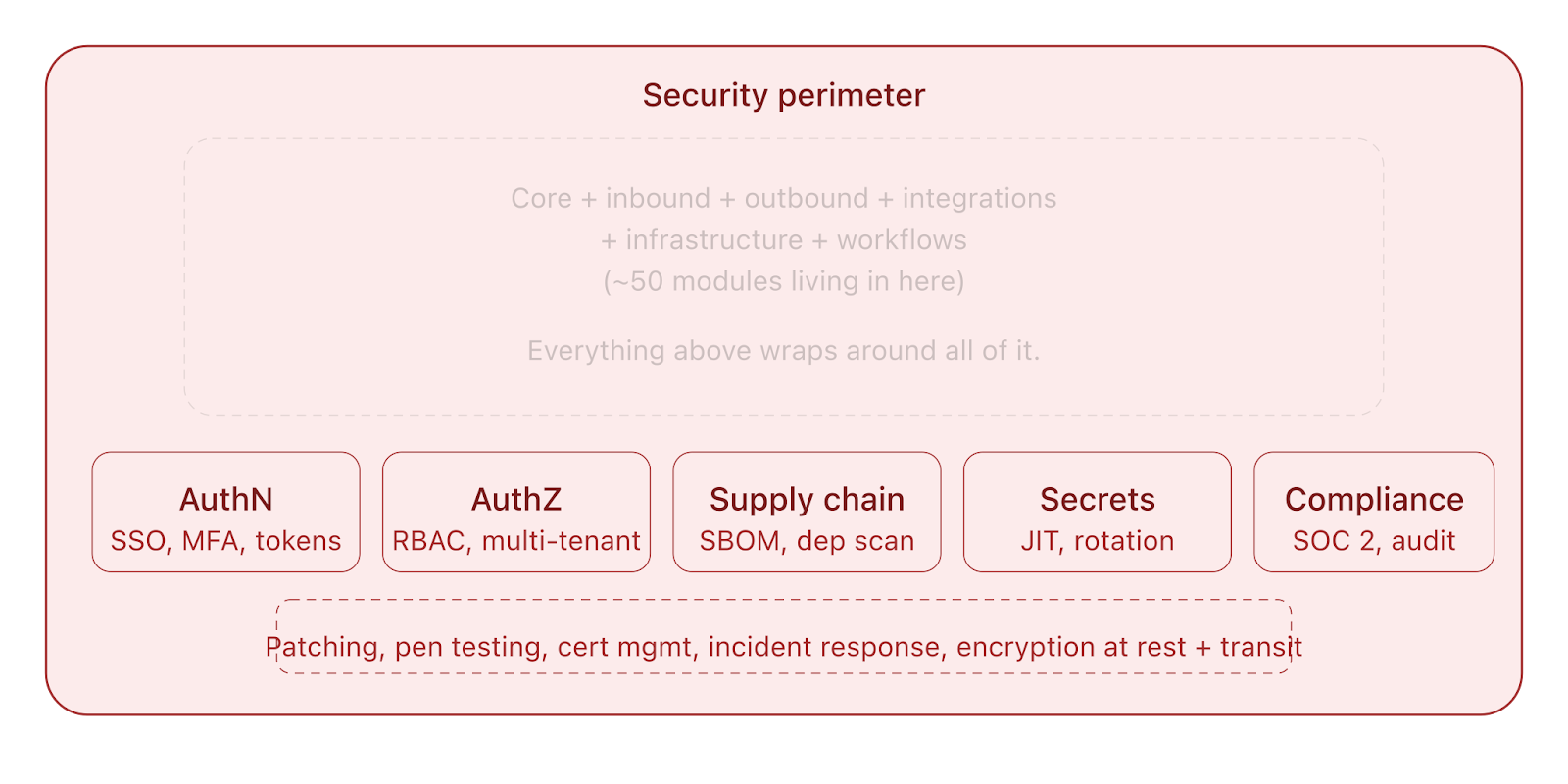
Authentication. Your warehouse workers, your merchants, your admins, they all need to log in. You need AuthN, and not just username/password. You’ll want SSO for enterprise customers, MFA for admin accounts, API key management for integrations, and token-based auth for the mobile app. Different customers will want different identity providers.
Authorization. A picker should not be able to see billing data. A merchant should not be able to see another merchant’s inventory. An admin in Warehouse A should not be able to modify Warehouse B’s configuration. You need a granular AuthZ system, role-based at minimum, attribute-based if you’re serious. And the permissions model gets complicated fast because you’re dealing with multi-tenant data where a single warehouse might service 50 different merchants.
Supply chain security. This is the one that keeps you up at night. Your system depends on hundreds of third-party packages. Two days ago, litellm, an open-source library used by thousands of AI applications, was hit by a supply chain attack. The attackers compromised the maintainer’s account, uploaded malicious versions to PyPI that stole credentials, SSH keys, cloud tokens, and Kubernetes secrets, then tried to deploy persistent backdoors across every node in the cluster. The compromised versions were live for hours before anyone noticed. This is not hypothetical. This is the world your WMS lives in if it has a deployment pipeline, third-party dependencies, and cloud infrastructure, which it does.
So you need dependency scanning, SBOM (Software Bill of Materials) management, vulnerability monitoring, container image scanning, and a secret rotation policy that actually works. You need to pin your dependencies and verify checksums. You need to assume that any package you pull from the internet can be compromised at any time.
And then there’s the daily drudgery: SSL certificate management, security patching, penetration testing, SOC 2 compliance (because your enterprise customers will demand it), data encryption at rest and in transit, audit logging for every sensitive action, and incident response procedures for when (not if) something goes wrong.
Added to the system:
- Authentication (SSO, MFA, API keys, token management)
- Authorization (RBAC/ABAC, multi-tenant permissions)
- Supply chain security (dependency scanning, SBOM, vulnerability monitoring)
- Security operations (patching, pen testing, compliance, encryption, audit logging, incident response)
The Full Picture
In biology, there’s a phenomenon called carcinization, the observation that evolution keeps independently producing crabs. At least five separate lineages of crustaceans have converged on the crab body plan over the last 250 million years. The crab shape is so effective for its environment that nature keeps arriving at it from completely different starting points. As the zoologist L.A. Borradaile put it in 1916, it is “one of the many attempts of Nature to evolve a crab.”
WMS systems are the crabs of enterprise software. It doesn’t matter where you start - whether you’re building from an order management tool, or a simple inventory tracker, or a shipping label generator, if you’re running a real warehouse operation, you will converge on the same body plan. You will end up with all of this. The modules below are not a wish list. They are what the environment demands.
- Order system: partial fulfillment, backorder management, order splitting, order routing engine, product substitution
- External integrations - Amazon (FBM + FBA), eBay, Shopify, Salesforce, NetSuite, Odoo, and more coming every quarter
- Bulk upload module + upload template manager
- Product management: SKU, identifiers, UoM system, UoM configuration, UoM master data management, customs & compliance (HSN codes, tariffs, declarations)
- Inventory - ledger-based immutable system, reconciliation, serialized inventory tracking, LPN tracking, location reservations
- Location management: location hierarchy, storage sections, location control plane, capacity management, warehouse layout codification, per-warehouse route optimization
- Consignment system - PO, returns, stock transfers, BOL generation, LTL shipping support
- Receiving system: buffer areas, workflows, assignment
- Putaway - recommendation engine, cross-docking module, drop shipping support
- Batching: by order, by SKU, wave picking, custom strategies, pick allocation
- Station management - station tracking, totes, carts, equipment
- Mobile app, multi-device, barcode/QR/RFID scanning module, exception management, fast search module
- Packing - packaging module, consumables tracking, palletization/de-palletization, bundling/kitting
- Shipping: direct carrier integrations (FedEx, UPS, DHL), carrier aggregators (EasyPost, ShipStation, Shippo), BYOI integration management, secrets management, rate shopping, label management, label design, print/device management
- Workflow orchestrator
- Rule engine
- Bin transfers
- Notifications management - email, SMS, in-app, push, configurable
- Webhook system, receive and send
- Rate limiting - for your own APIs and for respecting third-party limits
- Plugin architecture: per-warehouse customization, hardware integrations (pick-to-light, etc.)
- Authentication - SSO, MFA, API keys, token management
- Authorization, RBAC/ABAC, multi-tenant permissions
- Supply chain security - dependency scanning, SBOM, vulnerability monitoring
- Security operations: patching, pen testing, SOC 2 compliance, encryption, audit logging, incident response
- User management, permissions, customer management
- Dashboarding and reporting
- Database change management - structured edits, audit trails
- Billing: labor, consumables, storage
Go ahead. Count the bolded items.
And we finally reach

And this list is not even exhaustive. We haven’t gotten into PII management because your system is storing names, addresses, phone numbers across jurisdictions with different data protection laws and your customers might ask you about GDPR compliance. We haven’t talked about debugging production issues when a picker in a warehouse in Ohio reports that a scan isn’t matching and you need to figure out if it’s the barcode, the product data, the search index, the mobile app cache, or the label printer firmware. We haven’t talked about telemetry, the instrumentation you need across every service so that when something is slow or broken you can actually find it instead of guessing. We haven’t talked about the distributed systems problems that show up the moment you’re running multiple warehouses on the same platform - clock skew, eventual consistency, split-brain inventory, network partitions between services that need to agree on whether a location is reserved or not. We haven’t talked about webhook receiving resiliency. What happens when Shopify sends you a webhook and your system is down for 11 seconds? That webhook is gone. Did the order come through? Did the inventory update land? You need retry handling, idempotency, dead letter queues, and reconciliation jobs that catch what the webhooks missed - because they will miss
We stopped at ~60 modules. The real number is higher - it’s always higher.
The Trap
Here’s the thing nobody talks about: building it is the cheap part.
Getting a v1 up is the easy win. Maintenance is a different game entirely. Keeping integrations alive when Amazon changes its API without warning. Handling edge cases that only surface at 3am on a Saturday during peak season. Managing database migrations across a system this size without downtime. Keeping the mobile app performant on hardware that was old when it was purchased. Making sure your workflow orchestrator doesn’t paint you into a corner when a customer asks for something you didn’t anticipate. Rotating secrets before they’re exploited. Patching dependencies before the next litellm-style supply chain attack hits a package in your stack.
Companies with sprawling, unmaintainable systems fall into a trap we see over and over: they end up only building what their systems allow easily. The architecture constrains the business instead of enabling it. The WMS becomes the bottleneck, and the operations team starts working around the software instead of through it. Need partial fulfillment but your system can’t do it? Guess you’re holding the whole order. Need to route orders across warehouses but your architecture doesn’t support it? Guess you’re manually assigning them. The software calcifies. The business adapts to the software’s limitations. And then you’re stuck.
And here’s the more subtle point: you might not need all of this on day one. But you are going to need most of it to run a serious operation. The question is not “will I need this?” but “when will I need this, and will my architecture survive the addition?”
So, Should You Vibe Code Your WMS?
Look, we think vibe coding is great. Seriously. If you can solve your problem with a weekend hack, you should do it. We believe that the current wave of AI-assisted development is a net positive, and contrary to the discourse, we think it actually helps vertical SaaS companies with depth. Here’s why: it eliminates non-ideal customers. The people who can genuinely get by with a prompted prototype over a spreadsheet, they were never going to pay for a serious system anyway and why should they if their problems are something they can solve for much much cheaper. What remains are the customers who need the depth, the reliability, the maintainability that comes from years of accumulated operational knowledge baked into software.
We are experts at what we do. We have built and architected and led the development of systems that handle this level of complexity. When you can vibe code your way out of a problem, you absolutely should. But when things get big enough - when you’re juggling FBA inbounds across 3 AWS regions while your order routing engine is splitting a partially fulfilled order across two warehouses and your cross-dock workflow has an exception on a serialized item that needs to be rerouted to a different carrier through a different aggregator because the original one doesn’t service that zip code on Sundays and oh by the way a dependency in your deployment pipeline just got compromised and you need to rotate every secret in your Kubernetes cluster, you’re going to want a system that was designed for this.
And you’re going to want people who have scars from building it.


